Choose jpdb if you want Japanese vocabulary study organized around the books and shows you hope to understand. Choose Anki if you want to build and control your own flashcards, including their content and presentation. If your current reviews feel exhausting, identify what makes them exhausting before moving your entire vocabulary history.
Both can support vocabulary practice. The more useful question is which one leaves you willing to review—and with enough time left to read and listen to Japanese.
This comparison draws on official product information and linked learner discussions checked on October 22, 2026. It is a research-based guide, not an account of completing either system or a controlled learning test.
jpdb vs Anki at a glance
| Your priority | Start by considering | Why |
|---|---|---|
| Vocabulary from a particular Japanese book or show | jpdb | Its official site offers media vocabulary decks and tracks known words across decks. |
| Cards with your own explanations, images, and recordings | Anki | Its official site documents media support, customizable card layouts, and add-ons. |
| Choosing reading material around known vocabulary | jpdb | It connects vocabulary knowledge with its media database. |
| Flashcards for several subjects, beyond Japanese | Anki | You can organize your own material into decks. |
| Moving an existing collection | A small trial first | jpdb describes its Anki import as partial; migration should be checked before a full move. |
These are differences in workflow, not evidence that one produces faster learning for everyone.
What jpdb is designed to do
jpdb describes itself as a Japanese dictionary and learning system. Its homepage lists vocabulary extraction from text, prebuilt media decks, kanji study, and progress tracking across decks.
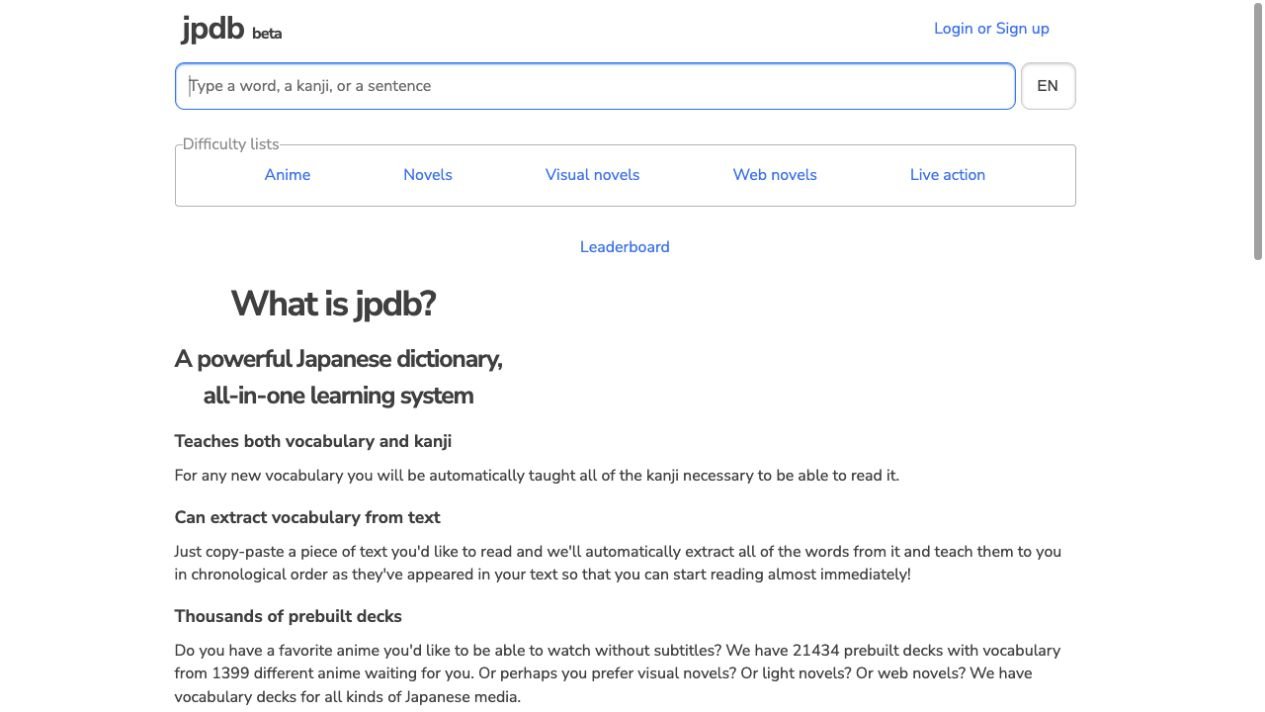
The connection between study and a specific piece of media is its main attraction. Rather than asking only which word to review next, you can ask which words stand between you and a novel you want to read. The site also describes helping users find material that overlaps with their known vocabulary.
That can give review a visible purpose. A deck associated with something you care about may feel more meaningful than an unrelated list.
Vocabulary overlap is still only part of difficulty. Knowing many words in a passage does not mean you will immediately understand its grammar, references, or implied meaning. Treat a vocabulary estimate as help choosing material, then read a sample yourself.
What Anki is designed to do
Anki is a flashcard program. Its official site documents synchronization through AnkiWeb, support for audio and images, customizable layouts and review timing, and add-ons.

For Japanese, that flexibility lets you decide what belongs on a card. You might keep a word with a sentence you understood, a short explanation of a confusing distinction, or audio from material you are permitted to use. You can also remove information that makes a card unnecessarily difficult.
The tradeoff is that you make more decisions. Choosing a deck, editing cards, and adjusting a workflow all take attention. You do not need an elaborate setup to start, but customization can become a separate hobby if you let it.
Use the official download page to identify the correct product for your device. It distinguishes the free desktop application, AnkiMobile for iOS, and the contributor-developed AnkiDroid for Android. Similar names in an app store do not establish that an app belongs to the same project.
What learners like—and what they disagree about
In a March 2024 Reddit discussion, the original poster said Anki reviews had become a chore. They found jpdb more motivating because a central vocabulary database connected their progress with anime and book decks.
That is a useful account of motivation. It does not establish that jpdb's review system is objectively better.
A reply from Scylithe described returning to Anki after using jpdb. Their concerns included customization, example material, and the time spent waiting between reviews. Other replies discussed backups and disagreed about export options.
Those comments describe experiences from 2024. They should become questions to investigate in the current product, not a list of defects assumed to remain unchanged.
There are also examples of people combining tools. In a July 2026 X post, a learner described using jpdb for vocabulary, WaniKani for kanji, Bunpro for grammar, and Japanese media for listening and reading. That is one person's routine, not a requirement to subscribe to several services.
Before switching, identify the actual problem
“I'm tired of Anki” can mean several things:
- The words have little connection to what you want to read.
- Too many new cards have created more review than you can comfortably finish.
- The prompts are ambiguous, or contain too much information.
- You spend more time maintaining cards than using Japanese.
A different platform may help with some of these problems. Others can follow you into a new system.
For example, a media deck may make your goal clearer, but adding more material than you can review will still consume time. Conversely, simplifying an Anki card may help if the problem is the card itself rather than the application.
Describe the problem in one sentence. “I want less setup before studying a particular novel” is a better decision criterion than “I need the best SRS.”
A small comparison you can make before migrating
The following is an editorial suggestion, not a test we have completed.
Choose one short text or a small group of words from material you want to understand. Try the relevant jpdb workflow and a simple Anki deck without changing your main collection.
Compare the things you actually notice: how much setup you need, whether the example helps you understand the word, how easily you correct an unhelpful prompt, and how the process feels on your usual device.
Then return to the original passage. Can you recognize the words there? A satisfying review session is useful, but the passage is why you started.
A short trial can reveal friction and preferences. It cannot demonstrate long-term retention or predict which system you will still enjoy months later.
Check migration and backup separately
jpdb's homepage says it can partially import an existing Anki database. Do not read “partial” as a promise to preserve every card, field, media file, and scheduling detail.
Before a substantial move, keep your original collection and confirm what the current import process accepts. The Anki export manual explains text exports and packaged decks, including options for media and scheduling information. Those formats serve different purposes, so choose the backup you intend rather than assuming every export preserves the same data. Check a small sample after importing. Also investigate how you would retrieve your data from the new system if you later wanted to leave.
The older Reddit debate about exports does not settle the current answer. Verify it directly rather than relying on either the most reassuring or the most alarming reply.
Leave room for reading and listening
Whichever tool you choose, keep contact with the material that gives the vocabulary a purpose. Review can help you revisit words; reading and listening let you encounter how those words behave in context.
If you want supported Japanese reading alongside flashcards, Satori Reader is another resource to investigate. If you are deciding how much structure you want around study, our renshuu review explores a different type of learning app.
Add another tool when it solves a clear gap. A longer app list is not itself a better routine.
Questions learners ask
Is jpdb better than Anki for Japanese?
It may suit you better if media decks and shared vocabulary progress reduce the work you dislike. Anki may suit you better if control over individual cards matters more. The sources here do not establish a universal winner.
Can jpdb replace a complete Japanese course?
Its vocabulary and kanji features serve particular study tasks. You will still need ways to understand grammar and use Japanese in meaningful contexts. Choose those around your current needs.
Should I use both?
You can, but first decide which job each will do. Duplicating the same daily reviews in two systems may create work without solving a new problem.
What should I try first?
If you already use one, start by fixing the specific part of your routine that feels difficult. If you are choosing from scratch, try one small workflow connected to Japanese you want to understand. Keep the option that makes it easier to return to that material.
Sources
- jpdb official homepage: product features and partial Anki import, checked October 22, 2026.
- Anki official homepage and downloads: flashcard features and platform products, checked October 22, 2026.
- Anki export manual: export formats and included data, checked October 22, 2026.
- Reddit: Switching from Anki to JPDB.io: March 2024 discussion and selected replies.
- X: NBinted's Japanese study tools: July 28, 2026.